> ## Documentation Index
> Fetch the complete documentation index at: https://docs.thnks.com/llms.txt
> Use this file to discover all available pages before exploring further.
# Data Model
## Thnks Data Model
### Thnks Object
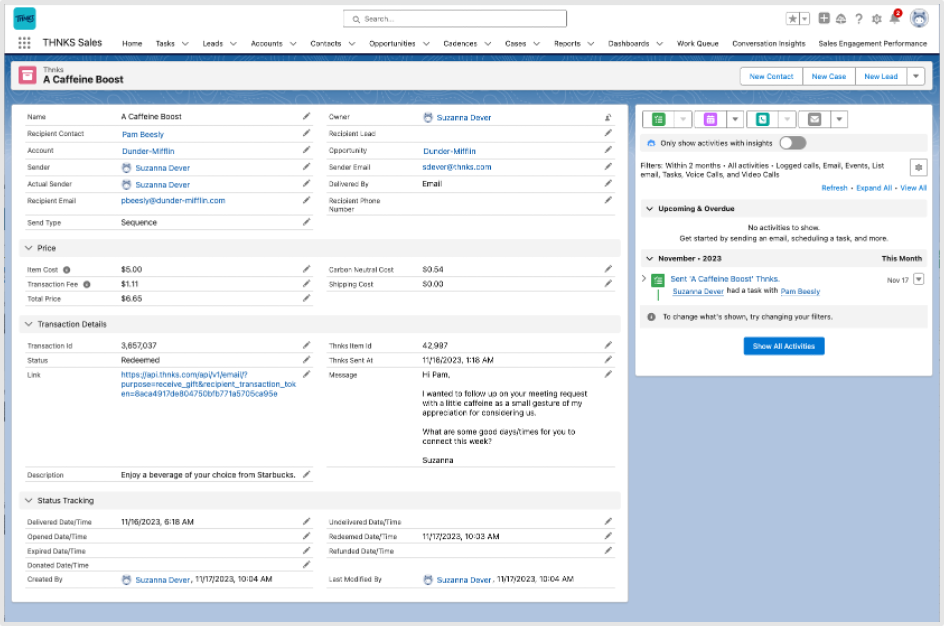 ### Thnks Record Creation
The following events trigger a change on the Salesforce side (either creating or updating records):
* A new Thnks is sent
* The status of an existing Thnks is changed (e.g. opened, undelivered, redeemed, etc.)
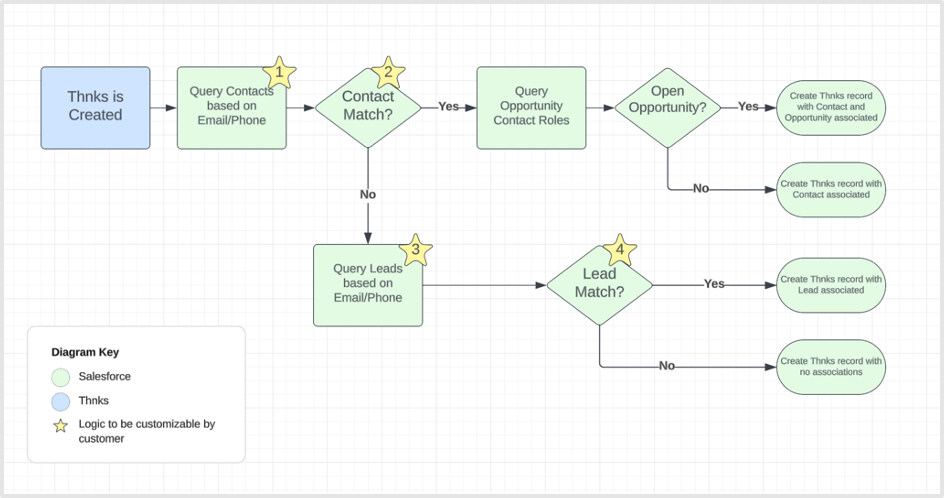
Upon creation, this is the general flow of what is occurring (note that a Task being created is possible at the very end, but this is not being shown in this diagram):
### Thnks Record Creation
The following events trigger a change on the Salesforce side (either creating or updating records):
* A new Thnks is sent
* The status of an existing Thnks is changed (e.g. opened, undelivered, redeemed, etc.)
Upon creation, this is the general flow of what is occurring (note that a Task being created is possible at the very end, but this is not being shown in this diagram):
 ```mermaid theme={null}
flowchart TD
A[Thnks is Created] --> B["Query Contacts based on Email/Phone ★"]
B --Yes--> C["Contact Match? ★"]
C --Yes--> D["Query Opportunity Contact Roles"]
D --Yes--> E["Open Opportunity?"]
E --Yes--> F[Create Thnks record with Contact and Opportunity associated]
E --No--> G[Create Thnks record with Contact associated]
C --No--> H["Query Leads based on Email/Phone ★"]
H --Yes--> I["Lead Match? ★"]
I --Yes--> J[Create Thnks record with Lead associated]
I --No--> K[Create Thnks record with no associations]
H --No--> K
style B fill:#CFF0C9,stroke:#333,stroke-width:2px
style C fill:#CFF0C9,stroke:#333,stroke-width:2px
style D fill:#CFF0C9,stroke:#333,stroke-width:2px
style E fill:#CFF0C9,stroke:#333,stroke-width:2px
style H fill:#CFF0C9,stroke:#333,stroke-width:2px
style I fill:#CFF0C9,stroke:#333,stroke-width:2px
subgraph key[Diagram Key]
direction TB
B1[Salesforce]
style B1 fill:#CFF0C9
B2[Thnks]
style B2 fill:#C9DFFF
B3[★ Logic to be customizable by customer]
style B3 fill:#FFD700
end
```
So as you can see, when a Thnks record is being created, Salesforce is checking the following:
* Is there a Contact to match?
* If no Contact is found, is there a Lead to match?
* If a Contact is found, is there an open Opportunity to match?
### Thnks Record Updates
After the initial Thnks is sent and the subsequent Thnks record in Salesforce is created (and potentially a Task), there will be no additional new records being created.
Instead, all that will be changing is the Status field (API name of thnksdev1\_\_RecipientTransactionStatus\_\_c) on the Thnks record whenever the status on the Thnks side is updated
### Task Logging for Thnks
If you have enabled “Task Syncing” in the Configuration tab, then every time a Thnks is sent, a Task will be automatically generated. There are two standard fields on Tasks for association with other records: Name and Related To (API Names of WhoId and WhatId, respectively).
The WhoId (Name) field can only be related to Leads or Contacts. The WhatId (Related To) can be related to any other object. For our purposes, the WhatId will always be related to the Thnks record.
* If the Thnks is associated with a Lead, then the Task will only be associated with the Thnks record via the Related To field (WhatId). The WhoId cannot be used in this scenario due to Salesforce limitations.
```mermaid theme={null}
flowchart TD
A[Thnks is Created] --> B["Query Contacts based on Email/Phone ★"]
B --Yes--> C["Contact Match? ★"]
C --Yes--> D["Query Opportunity Contact Roles"]
D --Yes--> E["Open Opportunity?"]
E --Yes--> F[Create Thnks record with Contact and Opportunity associated]
E --No--> G[Create Thnks record with Contact associated]
C --No--> H["Query Leads based on Email/Phone ★"]
H --Yes--> I["Lead Match? ★"]
I --Yes--> J[Create Thnks record with Lead associated]
I --No--> K[Create Thnks record with no associations]
H --No--> K
style B fill:#CFF0C9,stroke:#333,stroke-width:2px
style C fill:#CFF0C9,stroke:#333,stroke-width:2px
style D fill:#CFF0C9,stroke:#333,stroke-width:2px
style E fill:#CFF0C9,stroke:#333,stroke-width:2px
style H fill:#CFF0C9,stroke:#333,stroke-width:2px
style I fill:#CFF0C9,stroke:#333,stroke-width:2px
subgraph key[Diagram Key]
direction TB
B1[Salesforce]
style B1 fill:#CFF0C9
B2[Thnks]
style B2 fill:#C9DFFF
B3[★ Logic to be customizable by customer]
style B3 fill:#FFD700
end
```
So as you can see, when a Thnks record is being created, Salesforce is checking the following:
* Is there a Contact to match?
* If no Contact is found, is there a Lead to match?
* If a Contact is found, is there an open Opportunity to match?
### Thnks Record Updates
After the initial Thnks is sent and the subsequent Thnks record in Salesforce is created (and potentially a Task), there will be no additional new records being created.
Instead, all that will be changing is the Status field (API name of thnksdev1\_\_RecipientTransactionStatus\_\_c) on the Thnks record whenever the status on the Thnks side is updated
### Task Logging for Thnks
If you have enabled “Task Syncing” in the Configuration tab, then every time a Thnks is sent, a Task will be automatically generated. There are two standard fields on Tasks for association with other records: Name and Related To (API Names of WhoId and WhatId, respectively).
The WhoId (Name) field can only be related to Leads or Contacts. The WhatId (Related To) can be related to any other object. For our purposes, the WhatId will always be related to the Thnks record.
* If the Thnks is associated with a Lead, then the Task will only be associated with the Thnks record via the Related To field (WhatId). The WhoId cannot be used in this scenario due to Salesforce limitations.
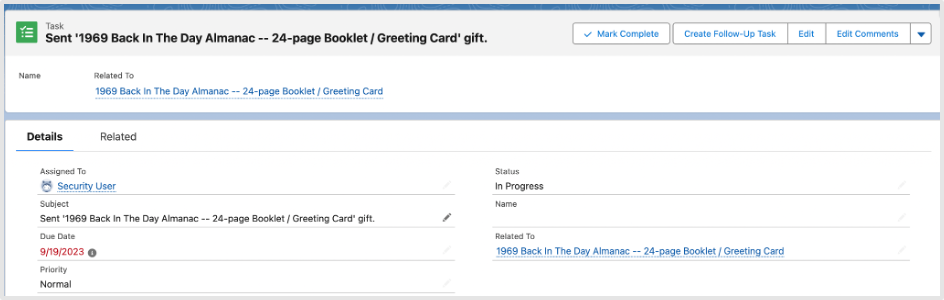 * If the Thnks is associated with a Contact, then the Task will be associated with the Thnks record via the Related To field (WhatId), as well as the Contact via the Name (WhoId) field.
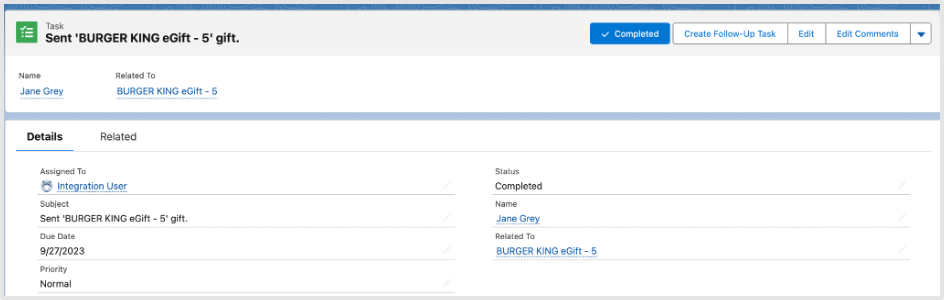 * If the Thnks is not associated with a Lead nor a Contact, then the Task will only be associated with the Thnks record via the Related To field (WhatId),